Generate images
hal0 generates images through ComfyUI, a node-graph Stable-Diffusion
runtime, running as one containerized generation engine tuned for the AMD
iGPU. Image generation is one of the four capability slots — embed,
voice, img, vision — alongside chat.
Because there is exactly one iGPU, image generation is mutually exclusive with the LLM stack: only one of them can hold GPU memory at a time. hal0 models this as a switchover driven by the GPU arbiter — the ComfyUI container stays resident, only its model memory is freed and reloaded.
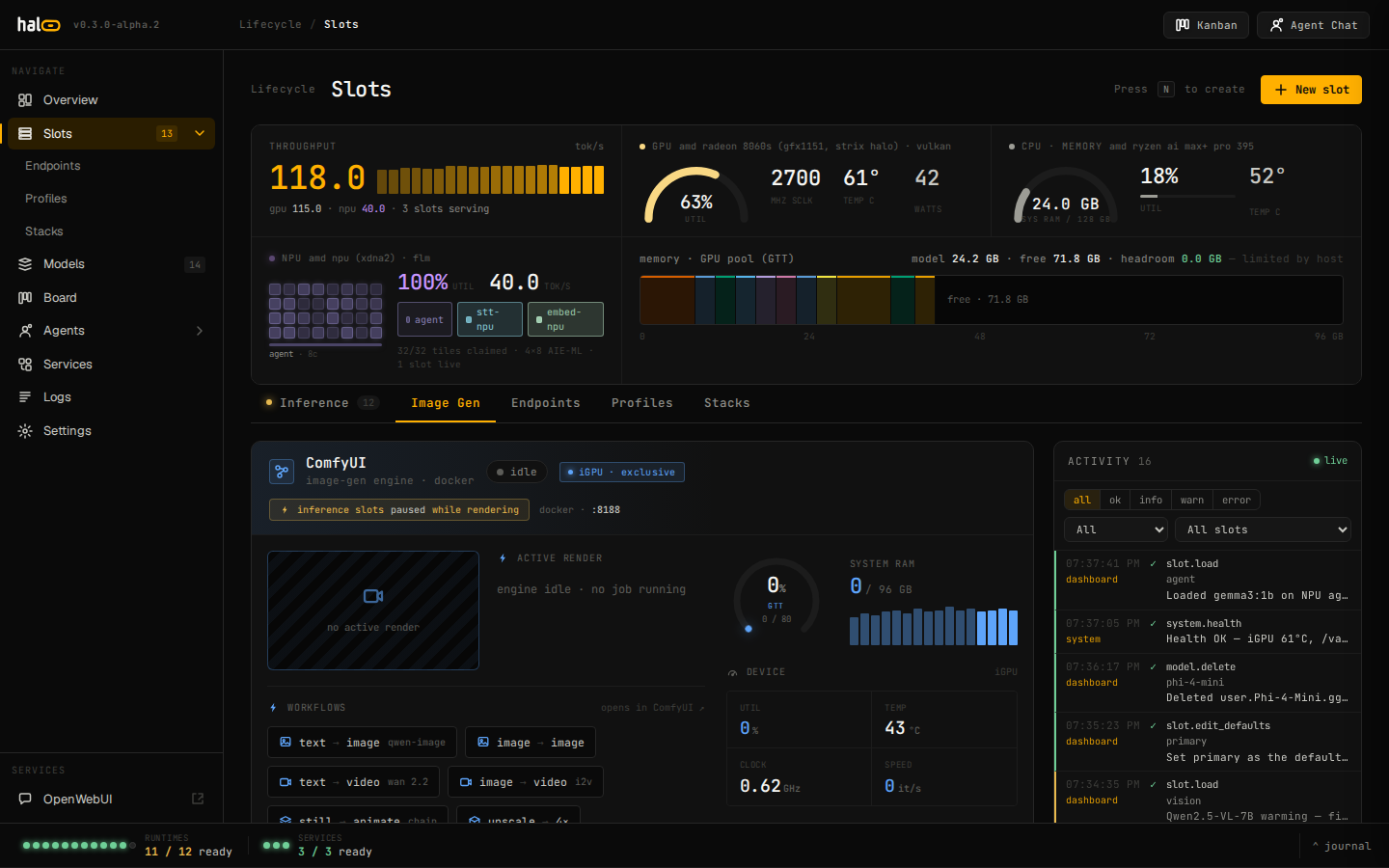 The Image-Gen tab: engine state, GPU memory gauges, queue, and switchover controls.
Enable the img capability
Section titled “Enable the img capability”hal0 capabilities set img img --model sdxl-turboThis is the same pattern as every other capability — set the child
(img) under its parent (img), pointing at an installed image model.
Pull a curated image checkpoint first with the standard model tooling —
see Choose models
— or bulk-fetch the curated set:
hal0 comfyui orchestrate-modelshal0 comfyui orchestrate-models --dry-runhal0 comfyui orchestrate-models --log-dir /var/log/hal0-comfyuiRead the generation-engine status
Section titled “Read the generation-engine status”curl http://localhost:8080/api/comfyui/statusKey fields:
mode—generation(ComfyUI owns the iGPU) orinference(the LLM stack owns it). The GPU arbiter is the source of truth.engine—running,generating(a render is in flight),starting(container up, port not bound yet), orstopped.reachable— whether ComfyUI’s HTTP API answers.container— theimgslot container’s state (running/exited/absent).memory— GTT and RAM gauges from ComfyUI’s/system_stats.queue—{running, pending}job counts.switchover— the in-flight switch tracker (active,target,error).
Every probe degrades to a safe default: a dead engine surfaces as
stopped, never a 500.
Switch the iGPU between modes
Section titled “Switch the iGPU between modes”The img slot runs as the hal0-slot@img.service systemd unit. To hand
the iGPU to ComfyUI (drains and unloads the LLM GPU slots, then ensures
the resident container is up):
curl -X POST http://localhost:8080/api/comfyui/switchover \ -H 'Content-Type: application/json' \ -d '{"mode": "generation"}'To hand it back to inference:
curl -X POST http://localhost:8080/api/comfyui/switchover \ -H 'Content-Type: application/json' \ -d '{"mode": "inference"}'Body fields:
| Field | Type | Notes |
|---|---|---|
mode |
string | generation or inference (required). |
force |
bool | Switching to inference drops any running/pending render. Without force, a busy queue is refused with 409. |
pin |
bool | generation only — hold image mode against the arbiter’s idle-restore. |
Responses: 202 (switching, poll /status), 200 (noop,
already in the target mode), 409 (switch already in flight, or a busy
queue without force), 503
(comfyui.arbiter_unavailable — the GPU arbiter isn’t wired on this
host; requires a configured img slot). Pin or unpin independently:
curl -X POST http://localhost:8080/api/comfyui/pin \ -H 'Content-Type: application/json' \ -d '{"pinned": true}'The [image] slot config
Section titled “The [image] slot config”The img slot’s [image] table carries idle_restore_minutes (default
60 — how long ComfyUI can sit idle before the GPU arbiter restores LLM
slots, hot-reloadable with no hal0-api restart), default_size
(default "1024x1024"), and default_steps. Set these from the
dashboard’s Settings → Image-gen panel or edit the slot’s TOML directly —
see Edit configuration.
Generate an image
Section titled “Generate an image”curl -X POST http://localhost:8080/v1/images/generations \ -H 'Content-Type: application/json' \ -d '{ "model": "sdxl-turbo", "prompt": "a cat in a hat, studio lighting", "n": 1, "size": "1024x1024", "response_format": "url" }'The route flips the GPU to image mode before dispatching, so a single
call also performs the switchover when needed. model must be in the
curated image catalogue — an off-catalogue model returns 404
(image.model_not_curated). A hal0 extension extra_body accepts
seed, steps, cfg, and negative_prompt.
The response is the OpenAI image shape:
{ "created": 1716000000, "data": [ { "url": "/api/images/cache/<uuid>.png" } ]}With response_format: "b64_json" each data entry carries a base64 PNG
instead of a url.
To cancel an in-flight or queued render:
curl -X POST http://localhost:8080/api/comfyui/render/cancelQuick-launch workflows
Section titled “Quick-launch workflows”The Image-Gen tab ships a workflow quick-launch strip — curated chips that deep-link straight into ComfyUI’s own UI. Any workflow JSON dropped into the bind-mounted workflows directory shows up as a “custom” entry:
curl http://localhost:8080/api/comfyui/workflowscurl -X POST http://localhost:8080/api/comfyui/workflows/my-workflow/launchSee also
Section titled “See also”- Manage slots — the
imgslot lifecycle. - Edit configuration — the
[image]table. - Logs and activity — tail
hal0-slot@img.